|
<< Click to Display Table of Contents >> Manage Properties |
  
|
|
<< Click to Display Table of Contents >> Manage Properties |
|
Icovia makes managing properties easy with its Manage Properties window.
| 1. | Select Manage Properties command from the File Menu by clicking on it. |
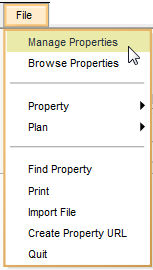
| 2. | This takes you to the Manage Properties window. Using this window, you can: |